#005 - The Trio - Slash Commands, Sub-Agents, and Skills
December 10, 2025
Enjoying this newsletter?
Subscribe to get future issues
Issue #005: The Trio - Slash Commands, Sub-Agents, and Skills
AI does the organizing, so you can focus on the work
December 09, 2025
Hey, welcome back.
This issue builds on what I shared in Issue #003. If you missed it, read it here. It covers how I set up my Obsidian vault as context for Claude. Today I'm going deeper into how I actually use it day to day, plus some Claude Code techniques that I use for all my workflows (Obsidian or not).
Before This System
I’ve tried every productivity system. Bullet journals. GTD. Notion databases. Apple Notes. Even handwritten lists when I was being romantic about the process.
None of it stuck. Not because the systems were bad. Because they all required me to be disciplined. And as much as I may want to be that person, I’m just not. I always gravitate towards spending my energy on the work itself.
So I stopped trying to be more organized. I started asking: what if the system did the organizing for me?
The Shift
Quick context: I keep all my notes in Obsidian. Just markdown files organized in folders. I call it “the vault.” Daily notes, project notes, ongoing tasks. Claude and I work in there together throughout the day.
Now my days start with /start-day. I log completed work with /done. I draft tweets with /tweets. I review code with /review.
These aren’t generic prompts. They’re personalized workflows I built with Claude. They know my projects. My note-taking system. My writing voice.
The discipline comes from the system, not from willpower. That’s why it finally works.
The Trio: How It Works
I use three Claude Code features composed together beautifully:
Slash commands are workflow triggers. I type /start-day and my morning routine happens. I type /done and my completed task gets logged to the right places. Each command is just a markdown file with instructions.
Sub-agents are specialized workers. When I run /start-day, it actually launches three separate agents in parallel: one scans my projects, one consolidates my tasks, one checks for pending code reviews. Each agent has a focused job. They gather context while I make my morning coffee.
Skills are reusable knowledge. My copywriter agent loads my voice guide before drafting anything. My code reviewer loads my conventions before analyzing a PR. Skills are just markdown files too.
A slash command orchestrates sub-agents that load skills. That’s the composition.
The best part? Claude is really good at writing these. I don’t hand-craft every command myself. I describe what I want, and Claude writes the markdown. When I notice a set of tasks I keep repeating, I’ll ask Claude to create a dedicated sub-agent for it. The tooling builds itself.
If you want to dig deeper, Anthropic has solid documentation on Claude Code and sub-agents.
What /start-day Actually Does
Let me walk through what happens when I type /start-day.
For client work, I use Linear to track issues. Some tasks live there. Some live in my vault. It used to be a mess trying to consolidate all of this every morning.
Now when I run /start-day, three agents launch in parallel:
Project scanner checks each of my active project folders for a next.md file. That file contains the next steps for that project. So I always know what’s queued up.
Task consolidator looks at my ongoing tasks, my project notes, the past week of daily notes, and my Linear and Github issues. It pulls together everything I might need to think about today.
PR reviewer checks GitHub for any code reviews waiting on me.
These three run at the same time. Takes maybe 30 seconds total.
Then a fourth agent, the daily planner, takes all that context and helps me build a realistic plan for the day. It asks me questions. Helps me prioritize. Updates my daily note.
Before this, I’d spend 20 minutes every morning trying to remember what I was working on. Now I get an executive summary and a focused plan. Nothing falls through the cracks.
The Meta Layer: How These Get Built
Here’s where it gets fun.
I have a command called /codify. After a productive session with Claude, I run /codify and it analyzes our conversation. It extracts the patterns that worked. Then it helps me turn that session into reusable tooling: a new command, a sub-agent, a skill, or some combination of all three.
The process of building AI tooling is the same as using it. You have a conversation. You iterate. You refine. Then you codify the pattern so you can use it again.
I built /codify using this exact process. It’s a command that helps me build more commands, agents, and skills. Meta, right?
I’ve thrown up a gist with the actual /codify command so you can see how it works. It’s just markdown instructions.
Self-Learning Loops
This is my favorite part. And it has a name: meta prompting.
The idea is simple: instead of hand-crafting every prompt yourself, you use the model to design and improve prompts for you. There’s a great video from Nate Jones that breaks this down if you want to go deeper.
My copywriter agent is a good example. It drafts content for me using my voice guide, templates, and past examples. After every session, it reviews what happened and proposes improvements.
“That paragraph you rewrote three times? Here’s a pattern to add to the voice guide so I get it right the first time next time.”
I approve the ones that make sense. They get folded into the skill. Next session, the agent is a little bit better.
The pattern: Observe what happened. Propose improvements. Approve the good ones. Codify them. Repeat.
The tooling evolves based on actual usage, not guesses about what might be useful.
Your Turn
You don’t need to build a whole system on day one. Start with a conversation.
Ask Claude to evaluate your workflow. Describe how you start your day, or how you ship code, or how you take notes. Ask it to suggest one or two things you could automate.
Then build those. Use them for a week. Run /codify (or just ask Claude to help you turn the session into a reusable command).
The entry point is the conversation itself.
Links and Finds
git-wrapped.com - Your year in commits, wrapped like Spotify. Fun way to see your productivity stats. Here’s mine. Can you spot when I started using Claude Code more seriusly?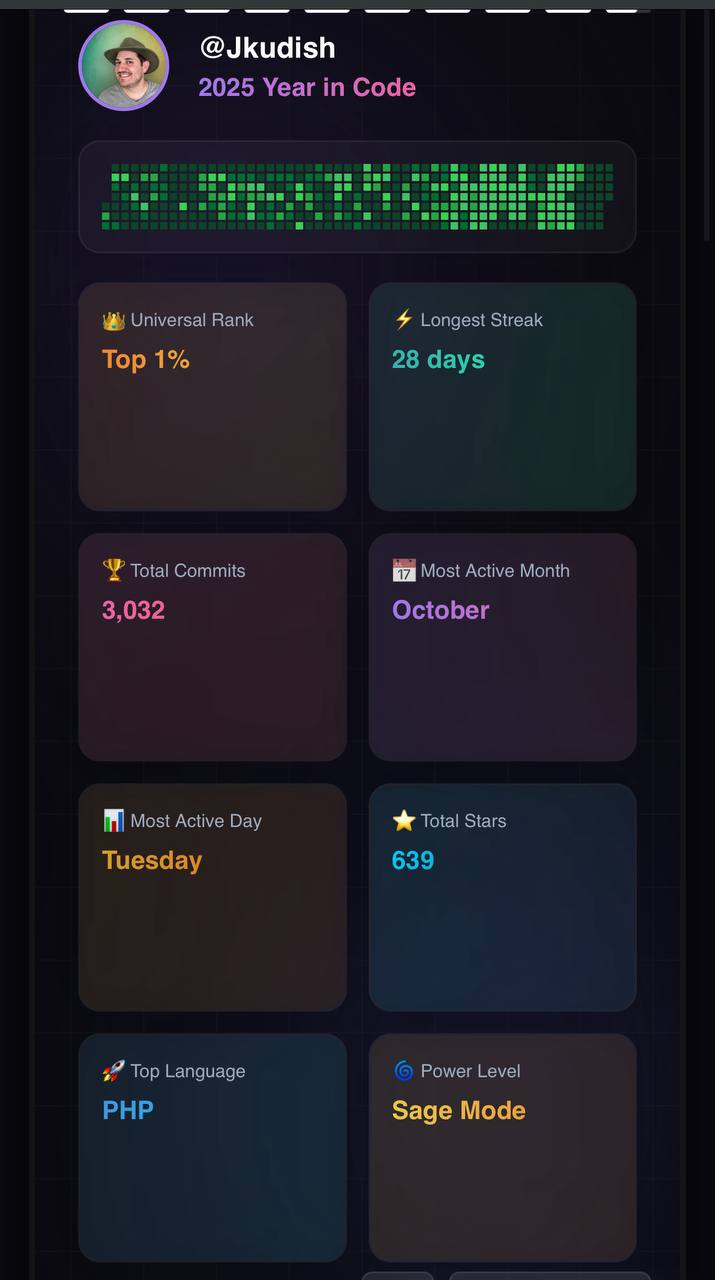
React Security Alert - There’s a nasty vulnerability in React Server Components affecting Next.js and other frameworks. If you’re running React 19, go check if you’re affected.
Here’s the prompt I used to check my projects:
“Check all projects in [my project folder] against this CVE https://vercel.com/changelog/cve-2025-55182 - anything I should watch for and are any of the apps vulnerable?”
Claude scanned everything and confirmed that thankfully none of mine were vulnerable. I only have one client project that uses Next.js but it’s on such an old version that it wasn’t affected. I should probably get them updated anyway!
What I’m Building
I’ve got some exciting updates to share about Tether and a few other projects. AI speeds up the work but there’s still so much to do. I’m also working on something new that I think will help AI builders like us. Can’t wait to share more… soon!
Follow me on Twitter/X whatever you wanna call it, @jkudish for updates as the year wraps up.
Until Next Time
What will you automate first? Morning planning? Task logging? Code reviews? Share your workflows with me!
By the way, I’m thinking about putting together a more in-depth guide or mini course on my Claude Code workflows. If that sounds useful, hit reply and let me know.
And if you do build something after reading this, send me a screenshot. I collect those!
Keep shipping,
Joey